Saturday, November 26, 2016

What requestAnimationFrame is ?

Animation with traditional way

For creating animation with JavaScript, we use setInterval() and setTimeout(). These functions execute the passed function at given time. And with setInterval, there would execute the function after each given time interval. The following example does console the message after every second.

function draw(){
 console.log(“draw something  after every second”);
}
setInterval( draw, 1000 );

Disadvantages of setInterval/setTimeout

So what are the disadvantages of setInterval/setTimeout. It does not care what is going on CPU/ Browser, enough resource is available or not, if there is low or high battery and if a user is in current tab of browser or in another tab. This stuff is not considered by setInterval/setTimeout.

It goes for executing the assigned task at given time of interval, It does not respect CPU resources, browser’s workload etc. These are the reasons, complex setInterval can cause the problem while other application uses the extensive CPU.  As a result, the browser would be unresponsive or crashed.

To overcome the problem

So get rid of all these issues, we can use requestAnimationFrame function. This API is created by people of Mozilla and adopted by other browser vendors, later.

So it’s basically used to create animation with JavaScript, let’s explore how does this work.

function draw() {
 console.log('Your draw code is executed here..');
 requestAnimationFrame(draw);
}
draw();
The draw method displays the message in a console of your browser. We execute this function by invoking draw();. Inside the draw function, after display the message, new draw() is  invoked by requestAnimationFrame(draw). The requestAnimationFrame does not invoke the draw method unless the browser is ready.  

Above script displays the message with 60 frames per second.  Short description about frame rate is mentioned at last of this article.

What if there is a need of less than 60fps

The below code is same like above(requestAnimationFrame) along the disadvantages of setInterval/setTimeout

setInterval(
 function (){
  console.log('Your draw code is executed here..');
 }, (1000/60)
);

If someone wants the frame rate less than 60, what to do? Not to worry, here is the solution. For example, if you want the 16fps by requestAnimationFrame. You could do something like this.

var fps = 16;
function draw() {
 setTimeout(
  function (){
   console.log('Your draw code is executed here..');
   requestAnimationFrame(draw);
  }, (1000/fps)
 );
}


In this code, we use the setTimeout function inside draw method to achieve the 16 frame rate per second.

There are great benefits of using requestAnimation, it asks the browser if there is the possibility of drawing of next frame, It draws only if possible otherwise it ignores.

Suppose you are using setInterval/setTimeout in your page, now you go to another tab in your browser. Chrome/firefox throttles the animation speed by 1 frame per second. However, it does not stop completely.

Traditional vs New way

If you create the same animation by requestAnimationFrame, then the animation task would be stopped and there are no expenses of CPU for this task while you are in another tab. Less CPU means a long battery for your laptop and mobile.

You can see the two different screenshots, first, is using by setInterval and second is using by requestAnimationFrame

animation with a traditional way


animation with requestAnimationFrame way

You can get the complete example over here. To see the difference, switch the tab after rendering these examples in browser

Frame Rate
By default, there is 60fps rate in  requestionAnimationFrame. With javascript, the frame rate is the rate, on which browser draws screen 60 times per second. In normal, the movie would play with 30fps, which means in one second, there are 30 pictures are summed together and presented like the movie.

Saturday, November 19, 2016

Web worker for separate thread in JavaScript

What Web worker is ?


JavaScript is a single-threaded programming language. It would be executed in a single thread only, this is the reason when you use heavy JavaScript code for your application, the UI of application would be blocked because the heavy script uses all CPU with main/single thread.


In a single thread, all the script is executed one by one, If the particular code uses the extensive CPU which means other code can not be executed meanwhile.

As a result, JavaScript application is not able to give the response to user interaction, so It’s pretty bad experience to end user.

Web-worker shines over here, what basically it does is, provide the facility of multi-threading for JavaScript application. So the application can use the heavy code in another thread by using web worker and make free the main thread to respond the user input.


For example, if you run large loop in your JavaScript code, which uses 95% CPU, now suppose user click on a button for any task, then user interface in the browser is not responded, in this case, we can place that heavy code in worker as a separate thread.

So that ”95% CPU consuming code” would be executed in the background with a different thread, and the main thread is available for User Interface.

How to use Web Worker ?

To add the web worker on your page, you could do something like.

 var anyWorker  = new Worker('anyJsFile.js'); 

anyJsFile.js is worker file treated as separate thread, now the worker object is available with anyWorker object,

By using postMessage() method with worker object we can send the data to worker, like

Main.js
// the data should be in object format
var car = {
  model : 'GLA-200',
 color : 'White',
 price : null
}
// the data would pass to the worker
anyWorker.postMessage(car); 
This above code sends the car object to the worker.

This car object can be found at worker file by doing something like
anyJsFile.js
onmessage = function (e){
 var wCar = e.data;
 wCar.price = '$70000';
 wCar.company = 'Mercidies Benz';
 postMessage(wCar);
}
After modified the car object you can pass the modified object by postMessage(wCar) method  to main thread(main.js)

By the following code, you can get that modified data as e.data on main thread with onmessage method

anyWorker.onmessage = function (e){
 // get modified object from worker
 var mcar = e.data; 
 console.log(
 'Car model is ' + mcar.model + '\n' + 
 'Car color is ' + mcar.color + '\n' + 
 'Car price is ' + mcar.price + '\n' + 
 'Car company is ' + mcar.company + '\n' 
 );
}


The below points are worth to read

Same Origin Policy

The worker file and the code for an attempt to using that worker should be placed in same origin policy. Like anyWorker.js and main.js file should be located under same domain like http://javascriptfuture.com

DOM/BOM

The BOM(browser object model) and DOM(document object model) are not available for the web worker.

You can find the working example with Web-worker.


Sunday, April 3, 2016

How to build/compile from phonegap app to android app by using android sdk and phonegap cli?

This article lights the information about build Phonegap app to android App (someApp.apk).

Tools Required

You need to install the below tools, this article is not about how to install these tools. You will get
various information on the internet about installing process.

1) nodejs
2) Git

After installing this, run below command for installing latest phonegap cli

npm install -g phonegap@latest

Now install the Android SDK ide from Here.

Add environment variable

Create new environment path variable ANDROID_HOME and add your Android sdk path as shown in below image. My android sdk location is as mentioned below, it might differ in your case.

C:\Users\suman\AppData\Local\Android\sdk


Add the below line in PATH variable, follow the instruction as shown in below image

;%ANDROID_HOME%\platform-tools;%ANDROID_HOME%\tools;


Be careful, do not remove any other path when you would add ANDROID_HOME path variable.

Chek Android Sdk is installed

Now run the command android from your “command prompt”, below screen ensures that the android sdk is installed.


Now you have installed all required tools nodejs, git, phonegap cli, and android sdk. Now it's time to create and build a phonegap project.

Create phonegap Project

Make a phonegap project by running

phonegap create hello com.myapp.hello HelloWorld

Customize the app

Now, do customize your app as your requirement. After done this go to project directory by

cd hello

From your project folder, Add the platform for your app according to your requirement, it's Android in my case, so I initiate the command

phonegap platform add android

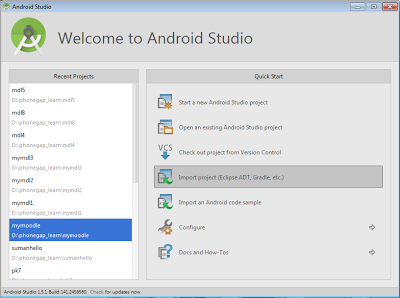
Now, import that created project hello in your Android Sdk IDE, for doing this open the android sdk and do click on link Import project (Eclipse ADT, Gradle etc) as in


After importing the project, select "Project Files" like


From here also you may able to customize the app as shown in below image


Build/Compile phonegap app to Android app

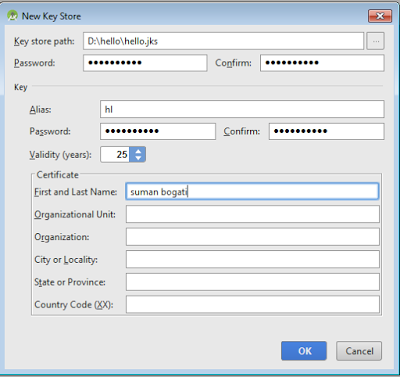
For compiling the app with your Android Sdk IDE, go to "Build -> Generate Signed APK",  and create the key for your app by providing required information as indicated by below image.


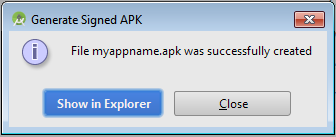
During the build process you can change the app file name as in my case it's myappname.apk,


Move on as suggested by and Android Sdk IDE, After a while, the build process will be completed and the window is opened as below


Now the app mappname.apk is ready to install in your android phone.

Sunday, January 10, 2016

How to minify the css by using grunt.

By this article I would like to tell how to minify the css by using Grunt. I am not going to tell how to install nodejs and npm. We need this for run Grunt in our computer. I have provided the link through which you can get the information about install nodejs and npm.

There are few steps by which you would know how to minify the css through using grunt.

1) Install nodejs and npm by This.

2) Install Grunt Cli(command line interface) by running the command
    npm install -g grunt-cli
  
  -g indicates global which means by any where you can run the 'grunt' command
 
By running the command 'grunt', The below screen-shot will ensure 'grunt command line interface' is installed.


3) Create your project folder eg: myproject.
 .
4) In created project folder, make the file'package.json' for install grunt and it's css minimizer module. The content for this file would be
 {  
   "name" : "myproject",  
   "title" : "minycss",  
   "version" : "1.0.0",  
   "devDependencies": {  
     "grunt": "0.4.1",  
     "grunt-contrib-cssmin" : "0.6.1",  
   }  
 }  

5) Now from your project folder, run the command 'npm install' to install these modules(grunt, grunt-contrib-cssmin).
Now there will be installed the mentioned modules into node_modules folder.

6) Now create the Gruntfile.js file in your project folder(myproject). The content of Gruntfile.js file would be
 module.exports = function(grunt) {  
      grunt.initConfig({  
           pkg: grunt.file.readJSON('package.json'),  
           cssmin: {  
                mincss: {  
                     // src: ['*'], Minify all css files into one   
                     src: ['layout.css', 'color.css'], // For minimize the selected files from source folder  
                     dest: 'styles.min.css' // After minimized css of two files into one   
                }  
           }  
      });  
      grunt.loadNpmTasks('grunt-contrib-cssmin'); // grunt module for minimize css  
      grunt.registerTask('default', ['cssmin:mincss']); // registering task mincss  
 };  


7) Now from your project folder, run the grunt task by command 'grunt mincss'

After run this command there will be created the file called 'styles.min.css' in your project.

In Gruntfile.js file, the task mincss we have registered is doing main work, it's basically what doing is gets the all css from files layout.css and colors.css, After that it does combine and minify the css in single file called styles.min.css.

Saturday, March 7, 2015

What is nodejs?

Since long time I wanted to write about nodejs, So finally the day is came today.

Introduction
nodejs is a software by which we can use JavaScript on server side which means we can use the JavaScript for http request and can do read/write kind of operations on server.

It's not a web server like Apache, it does not do anything by itself, you have to create a server who handles about http request and response by using it's various modules.

nodejs is usually used for real time application, something like chat, audio, video etc. It is used for I/O kind of applications eg:- database reading/writing, make network connection etc. It uses the non-blocking concept for scalable network application. It uses V8 engine for great performance on server side. The V8 engine is made by google used in google-chrome browser for fast browser experience.

nodejs uses the JavaScript's asynchronous behavior(event loop), which means when you would apply the particular task for particular event and don't worry about that task, whenever that event is occurred that particular assigned task would be performed, so nodejs uses this nature of JavaScript for performance of scalable network application.
http requests for read operation

So here we would know how the nodejs increases the performance on scalable network  application.
As you can see in above image, there is multiple http requests for server santa, the request is about to read the content from database and response back to server and finally display the content in browser/computer.

With traditional way, the whole Process 1 http request for read page and response the page to server could take the long time, the Process 2 is not started until the Process 1 is finished. The RAM and it's CPU would be in idle state until the Process 1 is completed. So this blocking nature does waste the lot of RAM and CPU when large of users would come.

This kind of situation can be handled by multiple threads, However switching between threads and RAM does waste the memory and CPU.

JavaScript is single thread language, so how nodejs achieves huge performance let's see, as we already knew JavaScript has asynchronous behavior. At above figure, to start Process 2, there is no need to complete the Process 1. So second connection/http request can be made without completed first request which means the Process 2 could be started without finished Process 1.
We don't have wait here, So no extra expenses of RAM and CPU. That's how there could make a lot of concurrent connections at same time which increases the performance  on network scalable application .

Main Benefits

1) It uses the non-blocking concept.
2) It can handle lot of concurrent connections.
3) It uses the single thread for make lot of network connections.
4) Because of single thread, there is a lot of benefit on Memory and CPU of server.
5) Same context on client and server, which means we can use JavaScript both in client and server that we don't need to worry about the switching the programming language for client and server.

You can  get the nodejs from nodejs

Sunday, March 1, 2015

BrowserSync

What is browsersync?

It's a browser testing tool, When you make web pages for different browsers and different devices. Or you can say when you working on responsive  web pages, you need to check web pages on all these different devices and browsers, So testing work is really tedious when you make some changes on html/css files and test it into different devices with different browser. The tool "browsersync" makes the testing work is really easy, this is one of the best feature of browsersync.


Here some main features I have listed out.

Interaction sync
You can mirror the various user's interactions for different browsers like, On a sinlge browser, If a user click  a link, click on button or scroll the page, these all actions would be mirror on other browsers, Suppose If you perform click action on chrome browser, this action would be perform into firefox and safari automatically.

File sync
Whatever changes you made with html, css or images, this changes would be updated on browser automatically without page refresh, Suppose if there is only one tag <p >  is existing in your page, now you would add image with <img> tag then there is no need to page refresh in browser, there would automatically refresh the page and shows the image with <img > tag in browser.

Browser support,
Most of the time we have to test our web pages on different devices like computer, tablet, mobile etc. With the use of browsersync we can test the page  on a single device and the action would be mirror in other devices as well. Suppose if you are making changes on some files and testing it on a desktop computer, at the same time we can see the differences on other devices like tablet, mobile etc synchronously, so we can do perform an action on single device and mirror this action on all other devices.

Remote Debug:- You can do remote debug like, From your desktop computer  you will be able to do debug html page displaying in android phone ,  for it these separate device should be connected.

How to install?

What other things you required.

It's a module of nodejs package, For run this tools you need to installed nodejs on your computer.
After installed the nodejs you need one of these command to let run by CLI.

For install globally which means you can run browser-sync from anywhere.
$ npm install -g browser-sync

For install locally which means you can run browser-sync fom locally only.
$ npm install browser-sync --save-dev

Also you can use this tool with task runner like Grunt and Gulp.

Good Resource
https://www.youtube.com/watch?v=heNWfzc7ufQ

In future post, I will explore the answer of below questions.

How to use it?

How it works?


Saturday, July 19, 2014

Difference between absolute and relative position

One of my student was asking  differences about absolute and relative positions, So here some points I have described.                                                                                                                                      

Figure
Source Code

Absolute Position-

When you apply the absolute position to particular element, it would be detached from current flow.
Absolute position is the position which is related to nearest ancestor relative element, If there is no relative ancestor of absolute-positioned element, then it's related to document element.

For example at above figure, we applied absolute to green div,  and green's nearest ancestor relative element is orange div, so left and top of absolute position of green div would be apply from orange div.

If there is not applied relative position to orange div then the ancestor element would be document tag and the left and top value would be apply from document element rather than from orange div.

Relative Position:-

It respects the flow, when you apply the relative position to particular element then the left and top value would be apply from where this element originally is existing.

Like the blue div is existing at below the yellow div, After applied the relative position on blue div it would be moved from where(From below the yellow div) it is existing.

Saturday, July 12, 2014

About prototype

What prototype is?

Prototype is an object, in JavaScript, a constructor(function) has a prototype which has it's properties, and methods.

These properties and methods would be inherited to instance which is created from particular constructor. Here we go with the example,

var Transport = function (){
this.name = "car";
this.wheel = 4;
}

Transport.prototype.run = function (){
console.log("The " + this.name + " " + " run fast");
}

tp = new Transport();
tp.run(); //this car run fast

Prototype-Figure:-1 

Here  the method run()  is defined through the prototype to Transport constructor.

Why we need the prototype in this way as we can do simple like this.

var Transport = function (){
this.name = "car";
this.wheel = 4;
this.run = function (){
console.log("The " + this.name + " " + " run fast");
}
}

tp = new Transport();
tp.run(); //this car run fast

Every time the Transport is invoked this.run has an instance of Function constructor, For each instance of Transport, there would be  each different instance of Function for run method.

In simple words, If we have instances of Tranport() like

tp1 = new Transport();
tp2 = new Transport();

tp1 and tp2 have different instance of Function for run method which means
tp1.run == tup2.run is false.

Where the run method is performing same behavior for both instances tp1 and tp2.

So  at Prototype-Figure:-1, we defined the run method through the prototype object, in this case the run method would be shared over the instances tp1 and tp2.
Which means tp1.run and tp2.run have same instance of Function for run method in this yo case you could say.

tp1.run ==  tp2.run //true

Think about thousands instances are made from Transpor(). If we don't use prototype concept then thousand different function instances would be created for run method to thousand instances.

If we use prototype then there would be only one function instance for run method when the instances of Transport are created.


We have illustrated this concept with below figure,


Under the part of "before use prototype", you can see three object instances.

Each new instance of function is assigned to run method of particular object, so there is three instances of new functions are assigned to run when three objects are created. If there is thousand objects then there will be thousand new instances of function  which is not god.

If we assigned the run method with prototype object of constructor then various instances  point to the same function run from prototype object, as you can see  at part under "After user prototype", three instances(Mercidies, Ferari, hondaCity) are sharing the same method run.

So performance wise it does matter when the objects in thousands or more.

Prototype for inheritance.

Till EcmaScript 5, JavaScript does not have class concept like PHP, Java. To achieve this concept in JavaScript, Prototype is very useful.

Inheritance is important concept for Object oriented Concept. Below example show the inheritance concept in JavaScript.


var Transport = function(){
this.motion = "movable";
this.move = function(){
console.log(this.name + " does move according to speed and its " + this.motion);
}
}

var Car = function (name, color, price, sound){
this.name = name;
this.color = color;
this.price = price
this.sound = sound;
this.sounding  = function (){
console.log(this.name + "is souding " + this.sound);
}
}

Car.prototype = new Transport();

var hondaCity =  new Car("honda city", "black", "$10000", "smooth");
hondaCity.move();
hondaCity.sounding();


We have a super class Transport and sub class Car, As you can see by this line

Car.prototype = new Transport();

We have inherited the property 'motion' and method 'move' from Transport into Car. So Car has the property motion and method move that's why hondaCity.move() display the "honda city does move according to speed and its movable".

So prototype can be use to achieve inheritance concept in javaScript.

Still there is problem in above example, as above discussed there would be created the multiple function instances when we create the various instances from Car constructor. Here is the improved version.

We split-ed the move function from constructor defined by located outside from Transport constructor like

var Transport = function(){
this.motion = "movable";
}

Transport.prototype.move = function (){
console.log(this.name + " does move according to speed and its " + this.motion);
}

var Car = function (name, color, price, sound){
this.name = name;
this.color = color;
this.price = price
this.sound = sound;
this.sounding  = function (){
console.log(this.name + " is sounding " + this.sound);
}
}

Car.prototype = new Transport();

var hondaCity =  new Car("honda city", "black", "$10000", "smooth");
hondaCity.move();
hondaCity.sounding();

How prototype chain works

When we  use particular property/method on particular instance, then first of all it would be search on that instance, if found then okay otherwise search operation would be perform in prototype of constructor from which that instance is made, The search would  be continue to upper level until the search is found or top level constructor is found.

Here we go with example,

As we know every instance has internal pointer to prototype object and  prototype object points to the constructor,  so what if prototype object has instance of another constructor. In that case prototype object points to the prototype of another constructor.

Here we go with above example.


Car.prototype has an instance of Transport constructor so it does point to prototype of Transport.

So when we execute the hondaCity.move() first it would be search on hondaCity, not found then it would be search on Car prototype still not found now it would be search on prototype of Transport now it is found and executed.

Saturday, April 19, 2014

Unit testing with sinon.js

During the unit testing of javaScript project, I came to know about sinon.js, I have not fully explored about this, however want to share some basics on this. So

What is Sinon.js?

Sinon.js is moking framework, which makes your test automate. The framework is made by javascript and it  has lots of feature like:- spy, stub, fakeTimer, fakeXhr and fakeServer. Later in this article, I'll describe about some of them.

Why we need Sinon.js?

You definetly want to make your unit test automate as much as you can. Making test automate means it does not depend over other test. The test will be performed alone for result pass or fail. During the unit test at some point you need to external resource for your testing, like you need to validate to response of ajax request. Or you want to validate the reponse which is came from server and you may need to test callback function. For that you need mock external resoruce, Eg:- fake server which does response your data , fake xhr which does response your request.

So basically sinon.js makes test is easy, maintainable and automate. Lest have some explore about it's feature.

Spy
Spy is a function that stores the arugments, it's calls, returned value, Through the spy you may know, how your function is working in your system, like how many times it's invoked, with which arguments its invoked. Lets take a look example how its worked.

For testig I am using qUnit framework

function add(a, b){
    alert(a + b);
}

test("Fake server is working", function () {
    var callback = this.spy(add);
    callback(10, 20);
    ok(callback.calledOnce);
    ok(callback.calledWith(10, 20), 'called with arugments');

});

First test is passed because callback() is invoked only once
Second test is passed because callback is invoked with 10, 20 arugments.

Stub
Stubs are like spies with predefined behaviours, which means you can use stub when you want to force the function/method to think the way you want. It can use all the api of spies. When you don't want to invoke direct function/method for testing, at that time you can use stubs,

Here is the simple example.
test("Fake server is working", function () {
    var callback = sinon.stub();
    callback.withArgs(42).returns(52);
    alert(callback(42));
    equal(callback(42), 52);
});

Fake server
You can create the fake server to response the data of request to server from your browser, and you can validate that resopnsed data.

Here how you can create fake server.
test("data from server", function () {
   var server = this.sandbox.useFakeServer();
    server.respondWith("GET", "/mytest",
  [200, { "Content-Type": "application/json" },
      '[{ "id": "52", "name": "Rock" }]']);
var callback = this.spy();
$.ajax({
url: "/mytest",
success: callback
        });

server.respond();
equal(server.requests.length, 1, "server request length");
ok(callback.called, "spy called once"); //failed
ok(callback.calledWith([{ id: "52", name: "Rock" }]));       //failed
});

Here we are calling the ajax function, and fake server is responding expected data.
By calledWith() method, we are cheking the relative paramters are passing on succesfull callback function. Here is  LIVE DEMO

Ofcourse I will update this article when will grab more about this topic.

Unit testing with javascript

UNIT TESTING

Well, I wrote some unit test for my project before six months, After that, I had left it and I had been working on the code without unit testing, I realized it's really hard to maintain the code without unit testing, Lots of time I am consuming for manual testing and maintain the code as it's complexity is increasing , So I want to make my code very maintainable, modularize with automate testing by using unit test.

So in this context I want to write some basic points about unit testing,

Why we used unit testing?
First of all unit testing means you have to test each unit of your code, which means your code would be very modularize, for write unit testing you need to put your code into particular function, and the function/method would be tested, we expect to do particular action by that function.

Whatever problem will be occured in your application, you would know on which function/method it's affecting.
You can make changes code without worry about it's bad effect into code because after changes the code you can run all the test at once and can see it's effect on partcular part of the code. You can fix these issue by working on particular code if there is any.

I am using the qUnit testing framework for unit testing of my application, which is very simple to use, It has various assertion.

Main asserstion

Check for for boolean(true, false) value
ok(true);
This assertion is passed when the condition is true.

Check for value equalness
equal(fval, sval) 
This assertion is passed when fval and sval are true, fails if these are not equal

Check equalness of value and data type.
deepEqual(1, "1");
This assertion does check it's data type also, above test would be failed.

And also it is used to compare the object like,
deepEqual({fname:'suman'}, {fname:'suman'}); 
The above assertion would be passed.

When you need to do test asynchronous function then you can use asyncTest(), For example you have a replay() function which is executed for 2 seconds. You can write the code for testing like this.

asynchTest("testing for replay", function (){
    replay();
    setTimeout(
    function (){
//this lastId is last executed id from replay();
equal(lastid, 20, the last id should be 20);
}, 
2100
    );
});

Here we invoked the replay() function, after execute this function with 2 seconds, the value of lastId should be 20, so we would check this value by running test after 2.1(2100) seconds.

As I will grip more about this will update the article.